
Clear payment slips and eUpravnik
A quick and easy overview of supplier invoices

To make our management service even more transparent, we redesigned the cost breakdown on the monthly statement when we introduced new software for calculating monthly charges.
The new solution gives users quick and clear access to supplier invoices.
Scan the QR code next to the recipient's name on the monthly statement. The system takes you to the eUpravnik portal, where you can view the supplier invoices used to prepare the statement.
The new payment slips clearly show monthly charges and give quick access to the related documents. The eUpravnik portal has been available to users since the February 2025 statement.
How to read the monthly statement
Below is an example of a Practic statement. It was prepared from a real statement, with personal and building data removed or replaced with fictitious data. The numbers on the image match the explanations below it; click the image to enlarge it.
You can also download the explanation of all marked items as a PDF and print it.
Statement explanation (PDF, in Slovenian)
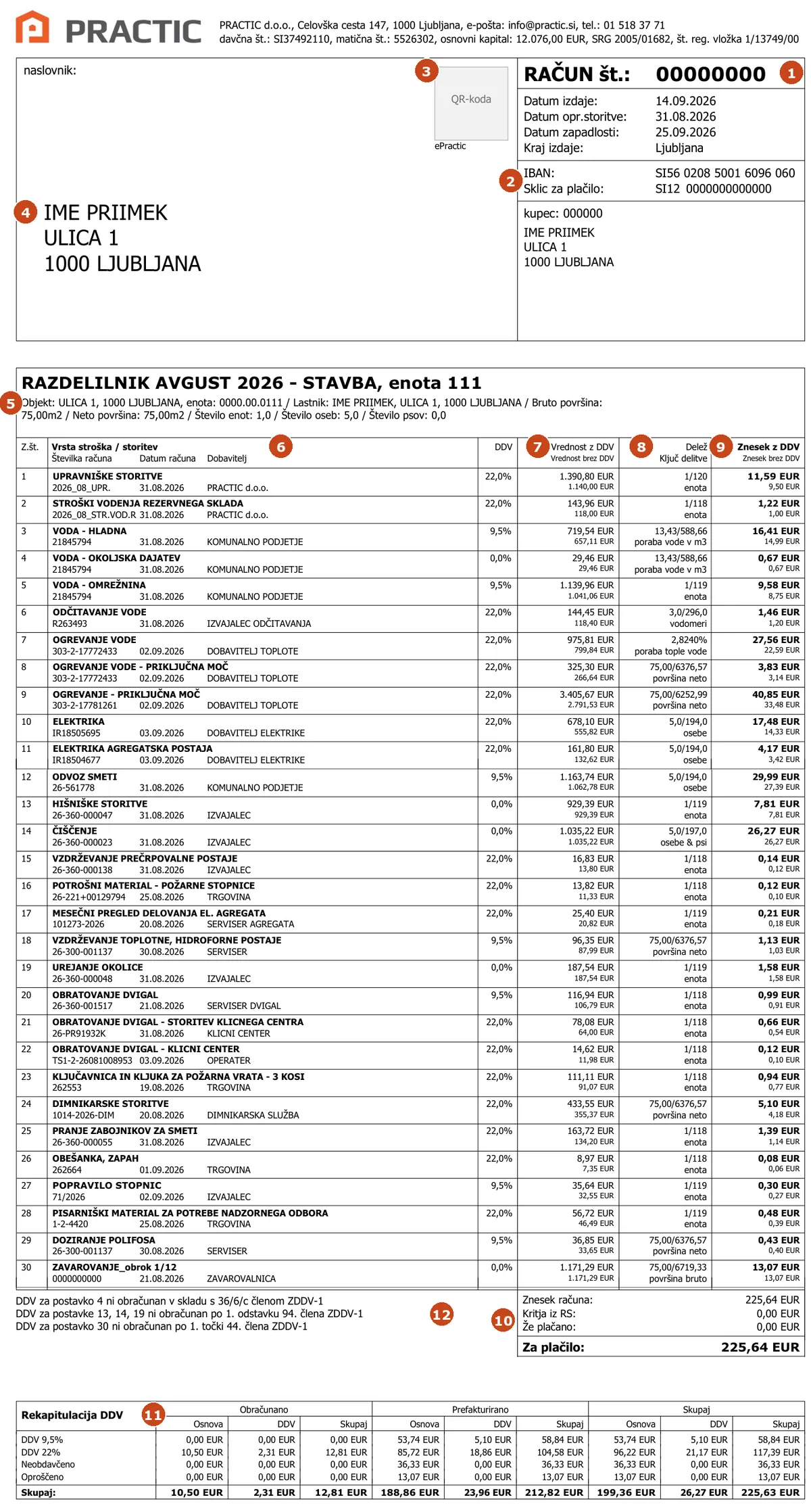
Invoice header and items
- Invoice number and dates. The statement is an invoice. The due date is the payment deadline.
- IBAN and payment reference. Pay to this account with this reference. The reference links the payment to your account, so enter it exactly.
- ePractic QR code. Scan it with your phone to open the eUpravnik portal with the supplier invoices used in this statement.
- Addressee and customer. Who the statement is sent to. The number next to the word »kupec« (customer) is your Practic customer code; please quote it when you call or write to us.
- Unit details. The flat or commercial unit designation, owner, gross and net floor area, and the number of occupants and dogs. Costs are divided on the basis of these data, so please tell us about every change.
- Cost type and supplier. Each cost shows the number and date of the supplier's invoice and the supplier. You can view the invoice in eUpravnik. In the example, supplier names are replaced with a general description such as »utility company«; your statement shows the actual supplier.
- Amount for the whole building. The supplier's invoice amount for the entire building, including VAT, and below it excluding VAT.
- Share and allocation key. What share of the cost falls on your unit and by which key. Examples: 1/120 means an equal share for each of 120 units; 13.43/588.66 means your consumption of 13.43 m³ of water out of 588.66 m³ in the building; 75.00/6376.57 means your net floor area out of the total; 5.0/194.0 means five occupants in your unit out of 194 in the building.
- Your amount. The amount for the whole building multiplied by your share, including VAT, and below it excluding VAT. In line 3: EUR 719.54 × 13.43 / 588.66 = EUR 16.41.
At the bottom of the first page is the UPN payment order with a QR code that you can scan in your mobile banking app.
Items from 12 onwards, total and VAT
The cost table continues on the second page, in this example with items 12 to 30. You read them in the same way as items 1 to 11 (markers 6 to 9). For cleaning the key is »osebe & psi« (occupants and dogs), where a dog counts as half a person; for insurance it is »površina bruto« (gross floor area).
The number of items depends on the building. Each building has its own costs, suppliers and equipment, such as a lift, a heat substation or a generator, so your statement may have fewer or more items than this example. Even for the same building the number changes from month to month, because some costs are one-off, such as repairs or purchases of material.
10 Amount due. The sum of all your amounts. »Kritja iz RS« is the part covered from the reserve fund and »Že plačano« any prepayment; both are deducted.
11 VAT summary. »Obračunano« are Practic's own services (management and reserve fund administration), »Prefakturirano« are supplier costs that we divide among the owners.
12 Items without VAT. An explanation of why VAT is not charged on some items, for example the environmental levy, services of contractors who are not VAT payers, and insurance.